
- August 23, 2026
- 174
- Business Storage, Guides, Self Storage
By Jared Mastroianni
Chief Operating Officer, modSTORAGE; CEO and Founder, Facily.ai
“They have access” is not an access record.
It does not say which identity can sign in, which role it holds, what resources the role reaches, which actions are allowed, why the grant exists, who approved it, when it should end, or whether removal was actually verified.
For a self-storage operator, that missing detail spreads quickly. A regional employee may administer several facility profiles. A vendor may edit one website but also inherit a parent account. A marketing user may publish content without controlling DNS. A developer may hold repository administration while a different identity owns the organization, deployment provider, domain, or billing account.
The practical control is simple:
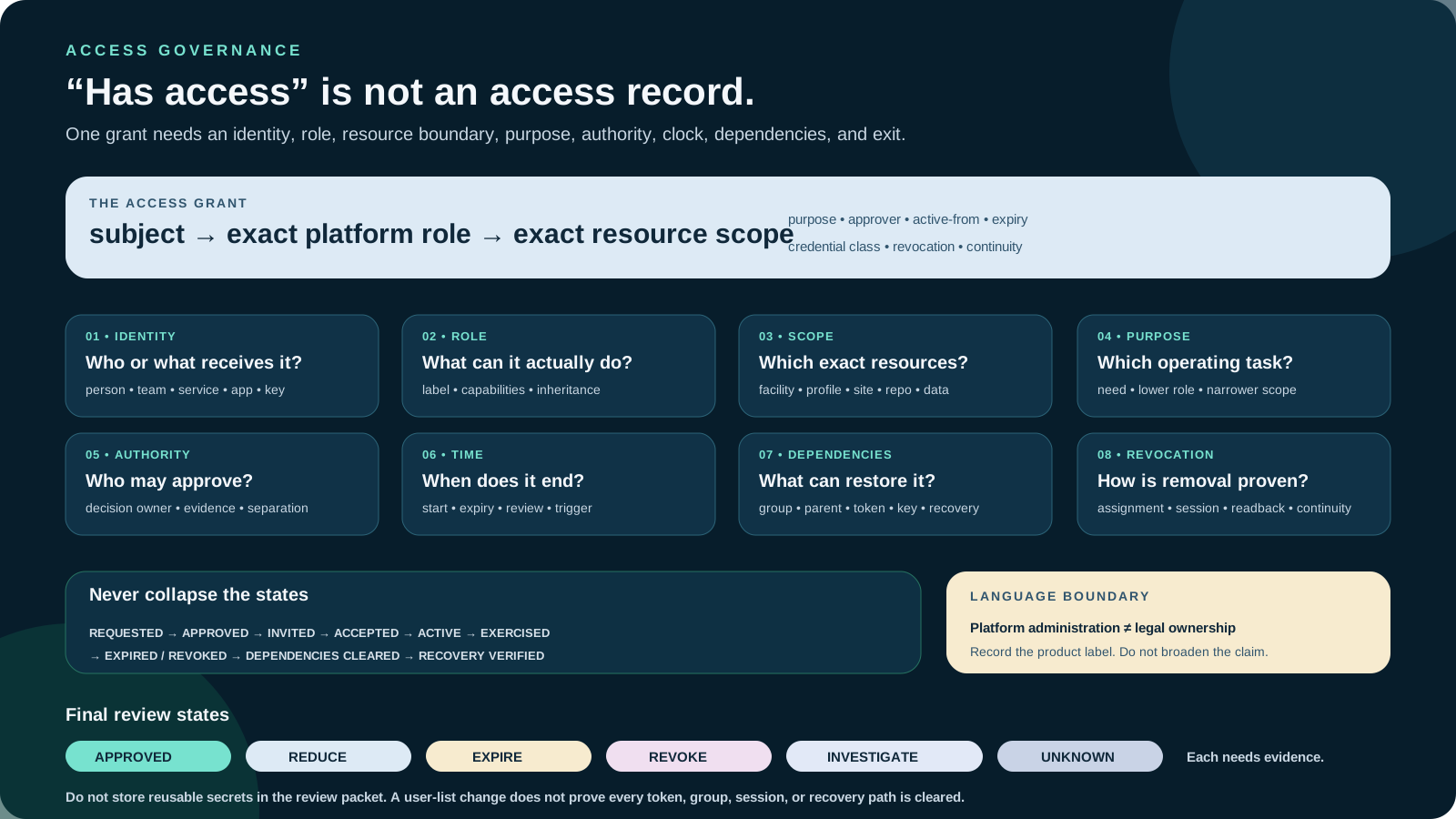
access grant = identity + role + scope + purpose + authority + start + expiration + revocation path
If one term is unknown, the grant is not fully governed.
This article presents a beginner-friendly review that can scale to multi-location and privileged-access architecture. It does not determine legal ownership, employment authority, contract rights, or compliance.
Platform administration is not business ownership
Platforms often use words such as owner, administrator, manager, or verified owner. Those are product-defined permission labels.
Google’s current Business Profile owner and manager documentation says owners can manage users and remove profiles, while managers cannot. It also distinguishes one primary owner among potentially multiple owners. That explains product capabilities. It does not establish who owns the facility, company, trademark, domain, content, or customer relationship.
The distinction is even more explicit in Search Console’s permission model. A verified owner uses a verification token; a delegated owner receives permission from another owner; full and restricted users have narrower rights. Removing a user may not remove a verified-owner token that can restore access. “Owner” in that interface describes a verification and permission state for a Search Console property. It is not a legal conclusion about the website or business.
The first rule of an access review is therefore:
Record the platform’s exact label and capabilities. Never silently translate it into broader ownership.
The eight-field access envelope
Review one grant at a time. The following eight fields form an access envelope around it.
1. Subject identity
Identify the person, team, service account, app, integration, key, or automation that receives access. Record the platform-native identity, not only a display name.
For a person, use an individually attributable account. Google’s Business Profile guidance recommends separate Google Accounts rather than password sharing. Shared credentials weaken attribution, complicate removal, and make it difficult to prove which person acted.
For a service or integration, record the owning team, credential type, rotation route, and emergency-disable owner. A label such as website-bot is not enough if nobody can identify who created it or which resources it reaches.
2. Role
Record the platform’s exact role and the effective permissions it carries today.
WordPress currently documents roles including Administrator, Editor, Author, Contributor, and Subscriber, along with underlying capabilities in its Roles and Capabilities documentation. Plugins, themes, multisite settings, and custom code can alter the effective capability set. An “Editor” label should not be reviewed from memory; inspect what the site actually permits.
GitHub’s current organization repository-role documentation lists Read, Triage, Write, Maintain, and Admin and advises choosing the role that fits the function without unnecessary access. Features can vary by plan. Repository Admin still does not prove organization ownership, domain control, billing authority, deployment-provider access, or possession of every secret.
3. Scope
Name the exact resource boundary:
- one facility or every facility;
- one Business Profile or a business group;
- one Search Console property or a parent property;
- one WordPress site or a multisite network;
- one repository, a team, an organization, or an enterprise;
- one deployment project or an entire provider account;
- one mailbox, shared mailbox, group, folder, dashboard, or dataset.
Scope must include inheritance. A person can appear to have a narrow assignment while receiving broader rights through a group, parent property, team, organization role, verification token, app installation, or shared credential.
4. Purpose
Write the operating task the access supports: update facility hours, respond to reviews, publish approved posts, review search diagnostics, deploy an approved release, reconcile billing, or support a defined integration.
“Needs access” is not a purpose. The purpose should make it possible to ask whether a lower role, narrower scope, or shorter period would still complete the work.
5. Authority and approver
Name the owner of the operating decision and the person authorized to approve the grant. The technical administrator who clicks “Invite” may not hold business authority to decide that a vendor, employee, or application should receive the role.
The NIST SP 800-53 Revision 5.1 control catalog addresses account types, account owners, approvals, role membership, privileges, usage conditions, monitoring, review, disabling, and removal. It also addresses least privilege. The catalog is written for federal information systems and must be selected and tailored; it is not a universal checklist or certification. Its useful operating lesson is that account management is a lifecycle with assigned responsibility.
6. Start, expiration, and review trigger
Every grant should have one of three states:
- time-bound — an exact start and end;
- standing with review — an exact review cadence and removal triggers;
- break-glass — normally inactive, with documented activation, monitoring, expiry, and post-use review.
Microsoft’s current Privileged Identity Management documentation describes product capabilities for time-bound and approval-based activation, start and end dates, justification, notifications, access reviews, and audit history. Those features are license- and platform-dependent. They illustrate the control pattern; they do not prove that another platform supports or enforces equivalent expiration.
Useful review triggers include role change, facility transfer, vendor offboarding, project completion, prolonged inactivity, failed authentication, credential rotation, source-owner change, incident response, or a material platform-capability change.
7. Credential and dependency path
Record how the subject authenticates and what dependencies can restore access:
- primary account identity;
- multifactor method;
- recovery email or phone ownership;
- identity provider and group membership;
- verification file, DNS record, tag, or token;
- API token, app installation, deploy key, service principal, or secret;
- parent-account or reseller relationship;
- domain, hosting, repository, deployment, and billing dependencies.
Do not place passwords, private keys, recovery codes, session cookies, or reusable tokens in the register. Record the credential class, custodian, vault or provider location, last rotation, and revocation route without exposing the secret.
8. Removal and verification
“Removed” needs an exact object and a readback.
Removing a user may leave group membership, tokens, app installations, deploy keys, active sessions, recovery factors, verification files, API credentials, or parent-level inheritance. Search Console explicitly warns that a verified owner may regain access if the verification token remains.
A complete removal record states:
- which assignment was removed;
- which dependent paths were checked;
- which credentials or tokens were revoked or rotated;
- which sessions were invalidated, if supported;
- what the platform reported;
- what a fresh readback showed;
- who owns any unresolved dependency;
- and when the evidence expires.
Run the ten-minute review
Choose one platform role for one person or service. Do not begin with the entire access estate.
- Capture the exact subject identifier.
- Capture the exact platform role.
- Enumerate effective permissions rather than trusting the label.
- List direct, group, parent, token, app, and shared-credential paths.
- Name the exact facility, property, site, repository, account, or data scope.
- Write the purpose and decision owner.
- Record approver and approval evidence.
- Assign an end date or review date and trigger.
- Document the non-secret revocation and recovery path.
- Choose a final state:
approved,reduce,expire,revoke,investigate, orunknown.
If the review cannot identify the scope, treat the grant as potentially broader—not safely narrow.
Separate the access states
Access work fails when teams collapse several states into one word.
- Requested — someone asked for access.
- Approved — an authorized person approved an exact role and scope.
- Invited — the platform created or sent an invitation.
- Accepted — the subject accepted it.
- Active — the role is currently usable.
- Exercised — evidence shows an action used the permission.
- Expired — the time window ended according to policy or platform.
- Revoked — the assignment was removed.
- Dependencies cleared — tokens, groups, sessions, apps, keys, and inherited paths were addressed.
- Recovery verified — required continuity access works through an approved path.
An invitation is not active access. Removal from a user list is not proof that every path is revoked. A role label is not evidence that the permission was exercised. A platform “owner” is not legal ownership.
Multi-location access needs a facility matrix
At one facility, an ambiguous scope may affect one listing or account. Across a portfolio, the same ambiguity can become a bulk-change risk.
Build a matrix with subjects down one side and stable facility IDs across the top. For each cell, show the platform, resource identity, role, inheritance source, purpose, approval, start, expiry, last review, and final state. Keep facility identity separate from facility name so renamed, moved, closed, or duplicate records do not silently retain access.
Then test four questions:
- Does any person have a portfolio-wide role for a single-location task?
- Does any vendor retain access after the related scope, contract, or project ended?
- Does any platform depend on one irreplaceable owner, recovery factor, or personal identity?
- Can the team revoke one facility without disrupting approved access to the others?
Do not “clean up” uncertainty by deleting first. Preserve evidence, identify continuity requirements, and stage a recoverable change.
Access decisions should be resource-specific
The NIST Zero Trust Architecture publication says zero trust does not grant implicit trust based only on physical or network location or asset ownership and focuses on protecting resources. This is architecture guidance, not a recipe for self-storage platforms. It reinforces a practical rule: an authenticated identity should still be authorized for the exact resource and action.
The joint CISA and NSA identity and access management best-practices publication also supports limiting account permissions to those necessary. It is general guidance, not proof that a particular access design is secure or compliant.
What AI can and cannot do
AI can help:
- normalize role inventories from approved exports;
- compare platform documentation with observed permissions;
- flag grants without scope, purpose, expiry, or approver;
- detect repeated identities and likely inherited paths;
- prepare review packets and removal checklists;
- and summarize changes for a human reviewer.
AI should not:
- infer legal or business ownership from a platform label;
- assume two similar names are the same identity;
- select the approver for its own access;
- expose or store reusable secrets in a review artifact;
- revoke access without an exact authorized plan and continuity check;
- decide that a role is safe because it is common;
- or mark revocation complete without source and dependency readback.
The AI output is a candidate inventory, not access authority.
The operator exercise
Select one role that can change customer-facing facility information, publish content, change technical settings, deploy code, manage users, or view sensitive operating data.
Complete the companion access review packet, access-grant control register, and readiness suite. Use the access-grant envelope to draw the role inside its resource scope and mark every inheritance, credential, recovery, and removal path. Then answer:
Can I identify the subject, role, effective permissions, exact resources, purpose, approver, start, expiry, dependencies, and verified revocation path without equating platform administration with ownership?
If not, the correct state is investigate or unknown—not “access confirmed.”
Sources
The companion source register records source owner, publication or version date, retrieval date, durable locator, claim supported, limitation, and provenance note.
- Security and Privacy Controls for Information Systems and Organizations, NIST SP 800-53 Revision 5.1, derived OSCAL publication, current source checked August 22, 2026.
- Zero Trust Architecture, NIST SP 800-207, NIST, August 11, 2020.
- Identity and Access Management: Recommended Best Practices for Administrators, CISA and NSA, December 2023.
- Roles and Capabilities, WordPress.org, mutable page checked August 22, 2026.
- Repository roles for an organization, GitHub Docs, current page with API version 2022-11-28 checked August 22, 2026.
- Manage your Business Profile owners and managers, Google Business Profile Help, mutable page checked August 22, 2026.
- Managing owners, users, and permissions, Google Search Console Help, mutable page checked August 22, 2026.
- What is Privileged Identity Management?, Microsoft Learn, mutable page checked August 22, 2026.