
- August 21, 2026
- 173
- Business Storage, Guides, Self Storage
Updated August 22, 2026. Automation is easy to admire when everything goes right. The real operating test begins when the source is stale, two systems disagree, an action affects access or money, or no one can tell whether a provider accepted the request.
That is where an exception ledger earns its place.
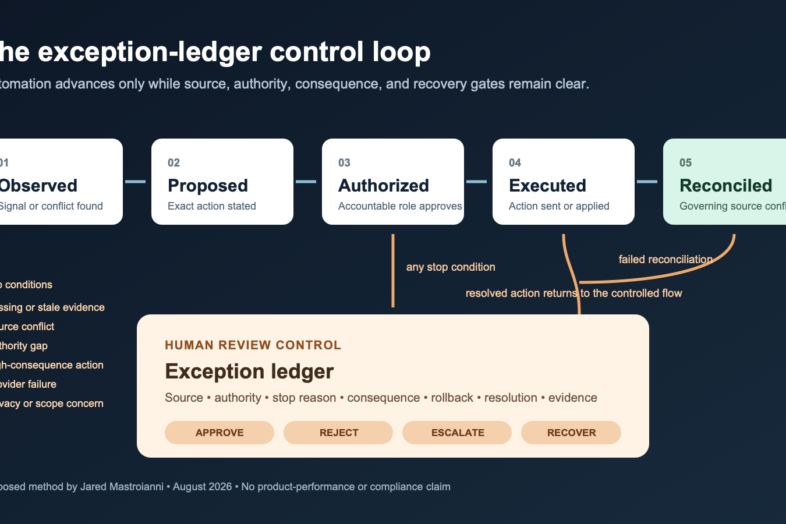
An exception ledger is a controlled queue of decisions that automation should not finish on its own. It records what happened, which source governs the decision, what the system proposed, who has authority, what evidence is missing, how the case was resolved, and what proves the result. It can be a spreadsheet, a ticket queue, a database table, or a purpose-built operating surface. The format matters less than the discipline.
The principle is simple: automation should accelerate routine work and expose exceptions before they become silent operating errors.
Start with the decision, not the tool
Operators often begin an automation project by asking what a new tool can do. A better first question is: which decisions may this workflow make, and under what evidence and authority?
Consider a few common operating situations:
- a facility-hours change appears in one public profile but not in the official location page;
- an access-control event does not match the status shown in the property-management system;
- a payment request was initiated, but no provider confirmation or reconciled ledger result is present;
- an AI assistant drafts a customer response from incomplete or outdated context;
- a maintenance alert repeats, but the prior resolution record is missing.
These are not reasons to reject automation. They are reasons to design a stop condition.
A useful workflow separates five states:
- Observed: a signal, record, or discrepancy was detected.
- Proposed: a person, rule, or model recommended an action.
- Authorized: the accountable role approved that exact action.
- Executed: the action was sent to the responsible system or provider.
- Reconciled: the governing source confirms the intended result, with exceptions resolved.
Those states should not collapse into one green checkmark. A click is not provider acceptance. Provider acceptance is not a posted accounting result. A sent message is not a customer resolution. A model suggestion is not authorization.
What belongs in the exception ledger
The smallest useful ledger answers four questions: What is the issue? What evidence governs it? Who decides? What closes it?
For practical use, I recommend the following fields:
| Field | Operating purpose |
|---|---|
| Exception ID | Creates a durable reference that does not depend on a person’s inbox. |
| Facility or scope | Identifies the exact location, portfolio segment, or system affected. |
| Workflow | Names the process: access, payment, maintenance, identity, communication, reporting, or another defined lane. |
| Detected at | Preserves the timestamp and timezone of the first known signal. |
| Current state | Uses a controlled value such as observed, proposed, authorized, executed, reconciled, or closed-with-limitation. |
| Authoritative source | Names the system or record that governs the decision. |
| Source observed at | Shows when the governing source was actually checked. |
| Evidence reference | Points to a safe record, receipt, export, or redacted artifact without copying unnecessary sensitive data. |
| Proposed action | States the exact action under review. |
| Decision owner | Names the role that can approve, reject, or escalate the action. |
| Action owner | Names the role or system responsible for execution. |
| Risk class | Applies the organization’s approved decision threshold. |
| Stop reason | Explains why automation paused: missing evidence, source conflict, stale data, authority gap, provider failure, or another controlled reason. |
| Due or review time | Prevents the queue from becoming a passive archive. |
| Rollback path | Defines how to reverse or contain the action if the result is wrong. |
| Resolution | Records approved, rejected, corrected, escalated, or closed-with-limitation. |
| Reconciliation evidence | Names what proves the final state in the governing system. |
| Reviewer and closed at | Preserves accountability and timing. |
The ledger should use pointers and redacted references whenever possible. It should not become a second uncontrolled store for customer messages, payment data, credentials, access codes, identification documents, or other sensitive records.
A practical decision classification
Every operator needs thresholds that fit its laws, contracts, systems, roles, and risk tolerance. The following is a proposed operating classification, not a legal standard:
Class 0 — Informational
The system summarizes or displays information but cannot change an operating record. Human review focuses on source quality, freshness, and whether the summary clearly exposes its limits.
Class 1 — Reversible internal work
The system creates or updates an internal task, label, draft, or routing decision that is easy to review and reverse. Batch review may be appropriate when the source and rollback path are reliable.
Class 2 — Customer-facing or operating change
The action changes a customer communication, facility-facing record, public identity, scheduling state, or another operating outcome. Approval should occur before execution unless a documented policy defines a narrow, tested exception.
Class 3 — Money, access, legal process, safety, or durable authority
The action could move money, affect physical or digital access, begin a legal or lien-related step, alter a safety control, create or remove durable permissions, or produce a difficult-to-reverse outcome. These actions need an explicitly authorized human path, stronger evidence, and independent confirmation of the result. The exact control must be defined with the responsible legal, financial, security, and operational owners.
The point is not to create a complicated scoring system. The point is to make it impossible for a high-consequence action to inherit the same default behavior as an internal reminder.
Four gates before execution
1. Source gate
Which system or document governs the decision? When was it checked? If two systems conflict, which one has priority, and who owns the reconciliation?
2. Authority gate
Who may recommend, approve, execute, and attest? Those roles may be the same for a low-risk internal task and deliberately separate for a high-consequence action.
3. Consequence gate
What changes if the action is wrong? Identify the affected facility, record, customer-facing surface, account, or downstream workflow. Do not use a generic risk label when a specific consequence can be named.
4. Recovery gate
Can the action be reversed? How quickly? What is the containment step if reversal is not immediate? A workflow without a recovery path is not ready for unattended execution.
A fictional example
Assume a fictional facility called Northline Storage receives a system alert: an access state in the gate platform does not match the status in the property-management system.
The automation should not guess which record is correct. It should create an exception with the facility, timestamps, the two source references, the detected conflict, and the current access-impact risk. It may recommend the next safe check. It should not change access until the authorized operator reviews the governing source and policy.
If the operator approves a correction, the case is not finished when the change request is sent. It moves to executed. It becomes reconciled only after the governing access system returns the expected state and the operator records the confirming evidence. If the systems still disagree, the case remains open or closes with a stated limitation.
No customer data or real company result is needed to test this design. A tabletop exercise can expose missing roles, sources, and recovery steps before live use.
Build the first ledger in 45 minutes
Choose one narrow workflow, not the whole company.
- Name the decision. Write one sentence describing what the workflow may change.
- Name the governing source. If the team cannot agree, record that as the first exception.
- Define the five states. Specify what proves observed, proposed, authorized, executed, and reconciled for this workflow.
- List stop conditions. Include missing source, stale evidence, conflicting systems, out-of-scope request, authority gap, provider failure, privacy concern, and failed reconciliation where applicable.
- Assign decision rights. Name roles, not just individuals, so the control survives staffing changes.
- Define the rollback or containment step. Test whether the responsible person can actually perform it.
- Run three fictional cases. Use one normal case, one source conflict, and one provider failure.
- Review the queue after one week. Look for unresolved aging, repeated stop reasons, unclear ownership, and cases marked complete without reconciliation evidence.
Download the automation exception-ledger starter template. It contains the fields above and three blank exercise rows. It contains no customer data and should be adapted to the operator’s approved retention, privacy, security, and legal requirements.
Measure the control without inventing success
An exception ledger creates useful operational measurements, but each measure needs a declared numerator, denominator, period, and source.
- exceptions per 100 workflow executions;
- percentage resolved within the defined review window;
- median time from observed to authorized;
- median time from executed to reconciled;
- percentage reopened after an apparent resolution;
- percentage closed with a stated limitation;
- repeat exceptions by source, facility, workflow, or stop reason;
- percentage of high-consequence actions with complete approval and reconciliation evidence.
These measures describe the control. They do not prove revenue, occupancy, labor savings, accuracy, safety, compliance, or customer impact without a separate method and evidence set. A falling exception count can mean the workflow improved, the detection failed, or people stopped recording exceptions. Interpretation requires context.
Where responsible AI fits
The National Institute of Standards and Technology’s AI Risk Management Framework 1.0, published January 26, 2023, is voluntary, non-sector-specific, and use-case agnostic. Its core calls for documented roles, ongoing monitoring, differentiated human-AI responsibilities, and defined human oversight. NIST currently notes that AI RMF 1.0 is being revised.
NIST’s Generative AI Profile, published in July 2024, adds suggested actions around data origin, content lineage, upstream dependencies, knowledge limits, ground-truth comparison, human oversight, privacy exposure, and monitoring the outcomes of human-AI configurations.
NIST Cybersecurity Framework 2.0, published February 26, 2024, offers a high-level taxonomy for managing cybersecurity risk and explicitly does not prescribe how outcomes must be achieved. NIST SP 800-53 Revision 5 is a flexible catalog of security and privacy controls; NIST’s August 27, 2025 planning note identifies Release 5.2.0 as the latest minor release.
An exception ledger is my proposed way to translate parts of that governance logic into day-to-day self-storage operations. It is not a NIST requirement, a certification path, legal advice, or proof that any particular automation is safe, compliant, accurate, or available.
The operating standard
The most useful automation does not hide uncertainty. It routes uncertainty to the person who can resolve it, with the evidence needed to decide and a clear path to reconcile the result.
That is the standard I would use before trusting any automated workflow in a facility or across a portfolio:
- the source is visible;
- the authority is explicit;
- the stop condition is designed;
- the action is reviewable;
- the result is reconciled;
- the recovery path is real.
Automation should do more than move quickly. It should know when to stop.
Sources and limitations
- National Institute of Standards and Technology, Artificial Intelligence Risk Management Framework 1.0, published January 26, 2023. NIST describes it as voluntary, rights-preserving, non-sector-specific, and use-case agnostic. NIST currently notes that version 1.0 is being revised.
- National Institute of Standards and Technology, Artificial Intelligence Risk Management Framework: Generative Artificial Intelligence Profile, published July 2024.
- National Institute of Standards and Technology, The NIST Cybersecurity Framework 2.0, published February 26, 2024.
- National Institute of Standards and Technology, SP 800-53 Revision 5, final December 10, 2020, with Release 5.2.0 identified in NIST’s August 27, 2025 planning note.
Disclosure: Jared Mastroianni is Chief Operating Officer of modSTORAGE and CEO and Founder of Facily.ai. This article presents a proposed operating method. It does not report product performance, customer results, independent research, legal conclusions, or a released Facily.ai or Facily OS capability.