
- August 23, 2026
- 160
- Guides, Self Storage, Storage Tips
By Jared Mastroianni
Chief Operating Officer, modSTORAGE
Beginner operator checklist · Updated August 22, 2026
A facility can be open for tenant access while its office is closed. A phone line can be answered while no manager is available for an in-person move-in. A kiosk can accept a rental while a truck-rental counter, retail sale, document review, or lock-cut service is unavailable.
Those are not edge cases. They are different operating controls.
When a website, directory, call script, chatbot, map profile, facility-management system, or staff handoff collapses them into one field called hours, the result may look tidy while becoming less accurate. The practical fix is to separate office hours, access hours, and service hours, then give each field a governing source, owner, effective date, and verification path.
This checklist shows how to do that without guessing which public page is correct.
Start with three definitions
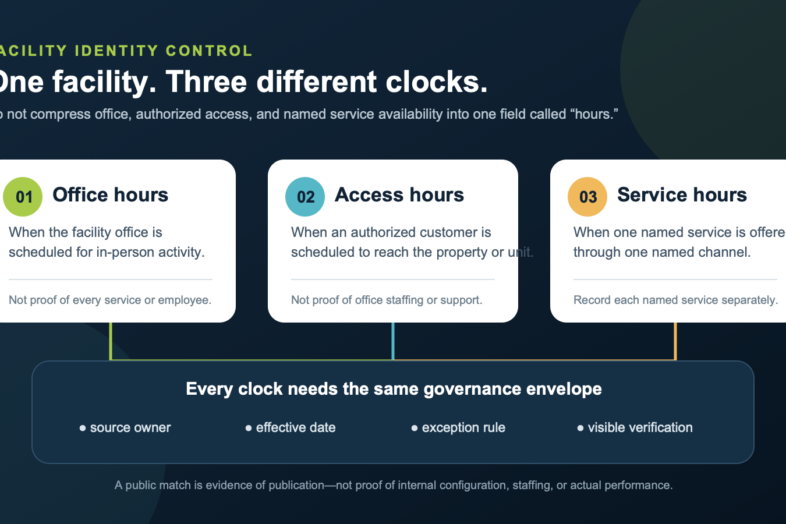
Office hours describe when the facility office is scheduled to be open for in-person office activity. They do not automatically prove that every service is available, that a particular employee is present, or that tenant access begins and ends at the same time.
Access hours describe when an authorized customer is scheduled to be able to enter the property or reach a unit under the applicable access policy. They do not automatically mean the office is staffed or that assistance is immediately available.
Service hours describe when one named service is offered through one named channel. Examples include phone support, in-person move-in help, truck rental, retail sales, document verification, lock cutting, deliveries, or after-hours escalation. Service hours should be recorded per service; a single catch-all schedule usually hides important differences.
Each definition needs four qualifiers:
- the exact facility or scope;
- the local timezone;
- the effective date and any holiday or exception rule; and
- the source owner authorized to confirm or change the value.
Why a source owner matters
A public page proves what that page currently publishes. It does not, by itself, prove that the same value is configured in the access-control system, call center, property-management system, staffing schedule, lease, or another operating source.
That distinction matters when two first-party pages disagree.
In a public snapshot observed on August 22, 2026, the current modSTORAGE Ocean Township facility page listed office hours of Monday through Friday 8:00 a.m.–5:00 p.m., Saturday 8:00 a.m.–5:00 p.m., and Sunday 8:00 a.m.–4:00 p.m.; it listed access as 6:00 a.m.–10:00 p.m. daily. A separate modSTORAGE Blog directions page for the same street address listed office hours of Monday through Friday 9:00 a.m.–5:00 p.m., Saturday 9:00 a.m.–3:00 p.m., and Sunday closed, while also listing access as 6:00 a.m.–10:00 p.m. daily.
The correct conclusion is not that the newer-looking page must be right. The correct conclusion is that a conflict exists and the designated source owner must resolve it.
The same public snapshot shows why the fields cannot be merged. The current Long Island City facility page publishes 24/7 access. A separate directions article lists office hours of Monday through Saturday 8:00 a.m.–7:00 p.m. and Sunday 9:00 a.m.–4:00 p.m., alongside 24/7 access. Whatever internal verification is still required, those published schedules describe different concepts.
These examples are dated public observations, not an internal audit, a legal relationship statement, or a claim about actual staffing or access performance.
The facility-hours control record
For every facility, maintain one row for each field type and schedule segment. At minimum, capture:
| Field | What it controls |
|---|---|
| Facility ID | The stable internal identifier; names alone are not enough. |
| Published name and address | The exact public identity used to match pages without inferring ownership. |
| Field type | Office, access, or one specifically named service. |
| Day or exception | Monday, Sunday, holiday, temporary closure, emergency override, or another explicit rule. |
| Local timezone | The timezone in which the schedule is meant to operate. |
| Observed value | The exact value found, without normalization that changes meaning. |
| Source URL or record | Where the value was observed. |
| Observed at | Timestamp showing when the source was actually checked. |
| Governing source | The record authorized to decide the value. |
| Source owner | The accountable role that can confirm or change it. |
| Effective date | When the approved value begins. |
| Conflict state | Matched, mismatched, missing, ambiguous, or awaiting confirmation. |
| Consequence | What a customer or operator could experience if the value is wrong. |
| Correction owner | Who updates each affected surface. |
| Published and verified at | Separate timestamps for the edit and the visible readback. |
| Rollback reference | The prior value, revision, or release needed to reverse the change safely. |
The governing source may differ by field. An access schedule might be governed by approved access policy plus live access-control configuration. Office hours might be governed by an approved facility schedule. A particular service might have its own program owner and channel configuration. Do not designate a source merely because it is easy to edit.
A seven-step audit
1. Resolve the facility identity
Start with the stable facility ID and exact address. Record naming variants, but do not use a similar name, city, legacy label, or map pin as proof that two records describe the same facility.
2. Inventory every surface
List the official location page, blog or directions pages, map and directory profiles, customer portal, call script, chatbot knowledge, email templates, signage, lease or policy text, access-control configuration, property-management record, and any service-specific schedule.
The inventory is not a declaration that every surface is authoritative. It is the comparison set.
3. Preserve the exact published value
Capture the schedule as shown, including days, punctuation, 12-hour or 24-hour format, timezone, holiday language, and labels such as “24/7,” “closed,” or “by appointment.” Add the observation timestamp and a safe evidence reference.
Do not translate “office” into “support,” “access” into “open,” or “24/7 access” into “24/7 staffing.”
4. Name the governing source and source owner
For each field, ask:
- Which record is authorized to decide this value?
- Who owns that record?
- What approval is required to change it?
- What downstream systems consume it?
- How will a temporary exception expire?
If no answer exists, mark the field awaiting source-owner designation. That is a real control state, not a reason to guess.
5. Compare field by field
Compare Monday office hours only with Monday office hours. Compare access with access. Compare phone support with phone support. A schedule is matched only when its semantic label, facility, days, times, timezone, effective date, and exception policy agree.
6. Correct in a controlled order
Once the source owner approves an exact value, update the governing record first if necessary, then update dependent systems and public surfaces in a documented order. Preserve the old value and rollback route.
For higher-consequence access changes, verify configuration, authorization, and a safe test plan before changing any live access-control state. This checklist does not authorize an access-policy change.
7. Verify the result where people see it
Read back every corrected surface on desktop and narrow screens. Expand hour accordions. Test map, call, email, directions, rental, and support controls. Check structured data and cached copies where applicable. A successful save is not the same as a visible correction.
The 15-minute manager checklist
Choose one facility and answer these questions:
- □ Did I match the exact facility ID and address?
- □ Did I record office, access, and each material service separately?
- □ Did I capture the local timezone and effective date?
- □ Did I check the current official facility page and every linked hours surface?
- □ Did I record each source URL and observation timestamp?
- □ Did I preserve conflicting values instead of overwriting them in my notes?
- □ Is one governing source named for each field?
- □ Is one accountable source owner named for each governing source?
- □ Are holiday and temporary exceptions explicit?
- □ Did an authorized person approve the exact correction?
- □ Did I preserve the prior value and rollback route?
- □ Did I verify the visible result after publication?
- □ Did I avoid inferring staffing, ownership, service availability, or access performance from a label?
If any answer is no, the record is not ready to be treated as governed.
A practical exercise
Download the companion facility-hours audit template and use the Ocean Township public-page observations above as a tabletop exercise.
Your job is not to choose a winning page. Your job is to:
- create separate rows for office and access hours;
- preserve both observed office schedules with their URLs and timestamps;
- mark access hours as publicly matched across the two pages;
- mark office hours as conflicted;
- leave the approved value blank;
- name the role that must own the decision; and
- define the evidence required before either public page is changed.
That exercise teaches the habit that matters most: a mismatch is an input to a decision process, not permission for an editor or automation to invent the answer.
Measure the control, not just the cleanup
Useful measures include:
- facility-hour fields reviewed divided by total in-scope fields;
- mismatched fields divided by fields reviewed;
- fields without a designated source owner divided by fields reviewed;
- time from conflict detection to source-owner confirmation;
- time from approval to publication;
- fields visibly verified divided by fields published; and
- repeat conflicts by source or workflow.
Always publish the numerator, denominator, period, source, and limitations together. A decline in visible conflicts could mean better governance, a smaller audit scope, or fewer checks. The measure needs context.
What this checklist does not establish
This method does not determine legal ownership, facility operation, employment, lease rights, access rights, staffing, emergency policy, or service availability. Public pages can be incomplete, stale, dynamically rendered, or in conflict. Internal systems can also be wrong. The purpose of the control is to surface uncertainty, route it to the accountable source owner, and verify the approved result.
Sources and limitations
Public observations were retrieved August 22, 2026 from:
- modSTORAGE Ocean Township facility page
- modSTORAGE Blog Ocean Township directions page
- modSTORAGE Long Island City facility page
- modSTORAGE Blog Long Island City directions page
These URLs are first-party published surfaces. They are cited to demonstrate field definitions and a dated public-source comparison. They are not represented as the governing internal source, proof of actual facility performance, or proof of a legal or operating relationship.
Disclosure
I am Chief Operating Officer of modSTORAGE. This article presents a governance checklist and dated public-page observations. It does not publish customer data, internal access settings, staffing records, or performance results, and it does not claim that any particular public schedule is operationally correct without source-owner confirmation.